The Hue feature on a A$49 light
Philips Hue can make your lights follow your screen. In Australia that means about A$550 of Hue hardware. I bought the cheapest Bluetooth LED bar I could find, for A$49, and built the missing piece myself.
The problem
The bar came with a phone app and a remote, and nothing else. There was no way for my Mac to talk to it, and no documentation for how it talks at all. What I wanted was simple to say: when the screen turns green, the room turns green.
Finding the protocol
A Bluetooth scan from a small Swift program found the bar advertising as MELK-OA10. Connecting to it exposed one service, FFF0, with a single writable characteristic, FFF3. That pattern belongs to a family of cheap controllers (often called ELK-BLEDOM), which take short 9-byte commands. The colour command turned out to be 7E 07 05 03 RR GG BB 10 EF, and the first test flashed the bar red, green, blue and white.
The built-in rainbow effects were harder, because their codes vary between models and the standard ones did nothing useful. So I wrote a small sweep: a window that stepped through every effect code every four seconds, showing the code in large type, while I watched the bar. The flowing rainbow I wanted turned out to be 0x01, and 0x02 is the same one running the other way.
The hard part: screens lie about colour
The first version worked and looked wrong. Every colour came out pastel, almost white. The reason is that a screen and an LED mix light differently: on a bar, even a small amount of the "other" channels in a colour (some red in a teal, say) shows up strongly and washes it out.
Rather than guess, I built a calibration window: pick any colour from a wheel, or grab one straight off the screen, and the bar shows it next to the on-screen swatch while sliders adjust the mapping. Tuning it by eye made the answer clear.
Gamma mattered far more than saturation. Raising saturation just pushed everything towards the same few primaries. A strong gamma curve (3.5) strips out the weak channels while keeping in-between hues distinct, and a lower blue gain (0.45) fixed this bar's blue cast.
Deciding what "the screen's colour" means
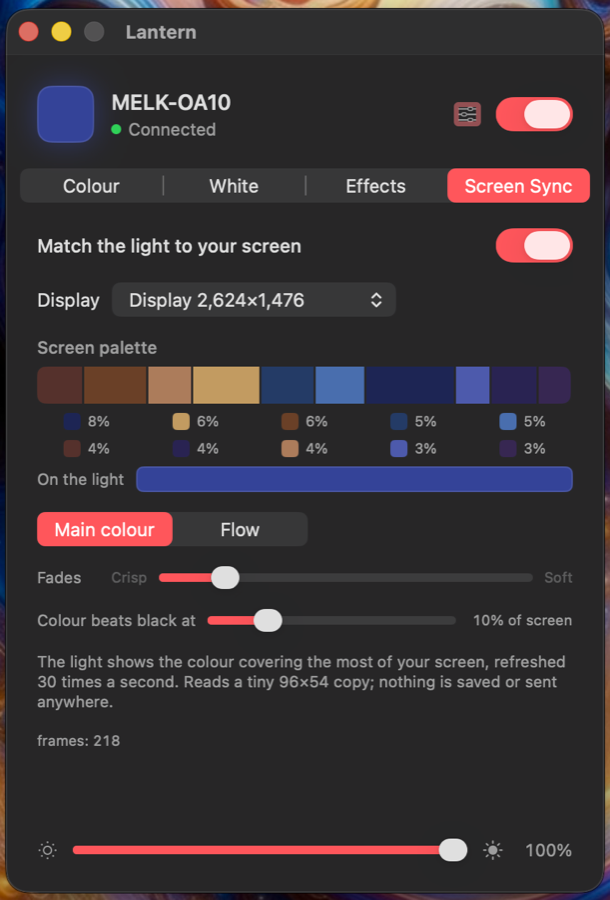
The app reads a tiny 96 × 54 copy of the screen 30 times a second and groups the pixels into colours. The obvious rule, "show the most common colour", broke in two ways:
- Dark scenes: black often covers the most pixels, which switched the bar off even when something bright was on screen. Now, if any single colour covers at least 10% of the screen (adjustable), it beats black.
- Greys: colours are spread over many hue buckets, while every grey pixel lands in one, so greys always won. Now all the colours compete together against the greys and against black, and the biggest single colour is shown when colour wins.
A toad photo on the website shows the rule working as intended: the bar matched the green background, not the toad, because the background covers far more of the screen.
Shipping it
Lantern is a native SwiftUI menu bar app: a colour wheel, a 2700 to 6500 K warmth scale, the bar's own effects plus a smooth whole-bar spectrum, the calibration tool, and screen sync. It is open source, with a website, a downloadable release and the protocol notes for anyone with a similar bar.
What I'd do next
- Fade between colours on the light itself rather than sending a stream of steps, to make transitions smoother.
- Support more controllers in the same family, which needs owners of other bars to test their effect codes.